A counter that increments each time a user completes a defined action within a set time window, typically once per day.
Best for
AchieverCompetitor
Context
ActivationRetention
Motivation drivers
MasteryOwnershipAvoidance
How it works
Loss aversion
The streak counter resets to zero if the window is missed. Its power comes from what it accumulates over time: a number representing a visible, unbroken history of behaviour. The longer it runs, the more it is worth protecting. Loss aversion does the work here, users return not to gain a reward but to avoid losing what they have built.
Core principle
Loss aversion. The streak converts passive interest into active retention pressure once the user has returned enough times to feel ownership over the number.
Watch out for
Streaks work best after day 3–7 when the user feels the number is worth protecting. Before that, frame them positively: show what maintaining the streak unlocks, not what breaking it costs.
Structural variants
Four ways to build it
01
Hard Streak
resets to zero on miss
02
Soft Streak
bonus without reset penalty
03
Streak Shield
consumable that absorbs one missed day
04
Goal-based Streak
tied to XP or time target
Lifecycle placement
High value days 0–30. Identity marker from day 30+.
Case studies · 7
Seen in the wild
CalmWellness
How they use it
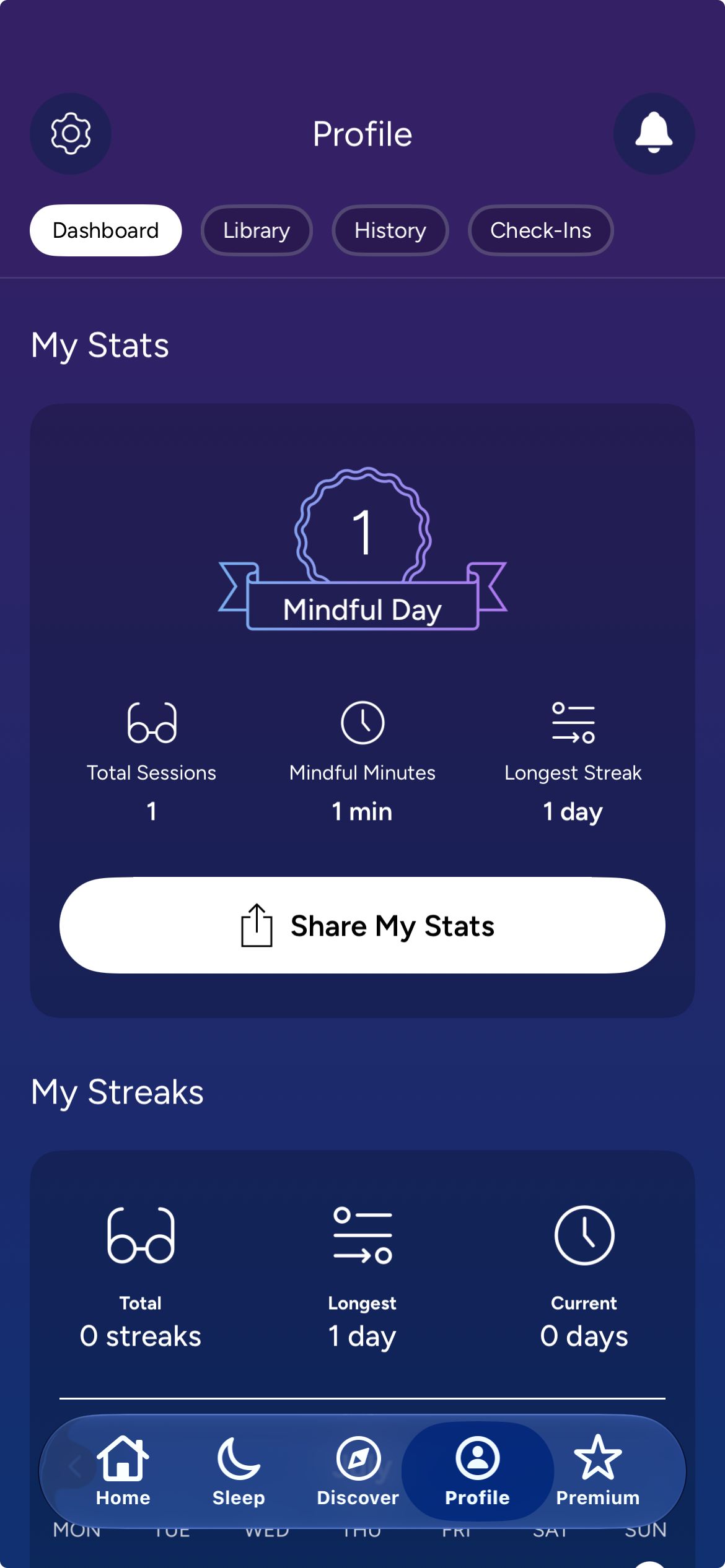
Streaks are tracked on the profile page under 'My Streaks,' showing current streak, total streaks, and longest streak alongside a calendar marking practice days. Stats on the same screen show mindful days, total sessions, mindful minutes, and longest streak. Mood check-ins, the Daily Calm reflection, and gratitude check-ins all appear to contribute to the daily practice count. The streak counter is togglable in settings and shareable via pre-formatted Instagram Stories and messaging options.
Why it works
The streak sharing mechanic is distinctive: streak milestones generate formatted Instagram Stories and messaging options as separate formatted cards. Each streak milestone shared is a product impression in a social context. Multiple check-in types contribute to the daily practice count, giving the streak multiple completion paths beyond content playback.
The detail
The streak is on the profile tab, not the home screen, navigating to the profile is required to find it. Unlike Insight Timer, where the streak flower icon is immediately visible on the home screen, Calm does not surface the current streak number in primary navigation.
Takeaway
The streak is located on the profile tab rather than the home screen, significantly lower prominence than Insight Timer's home screen flower icon or Strava's dashboard carousel placement.
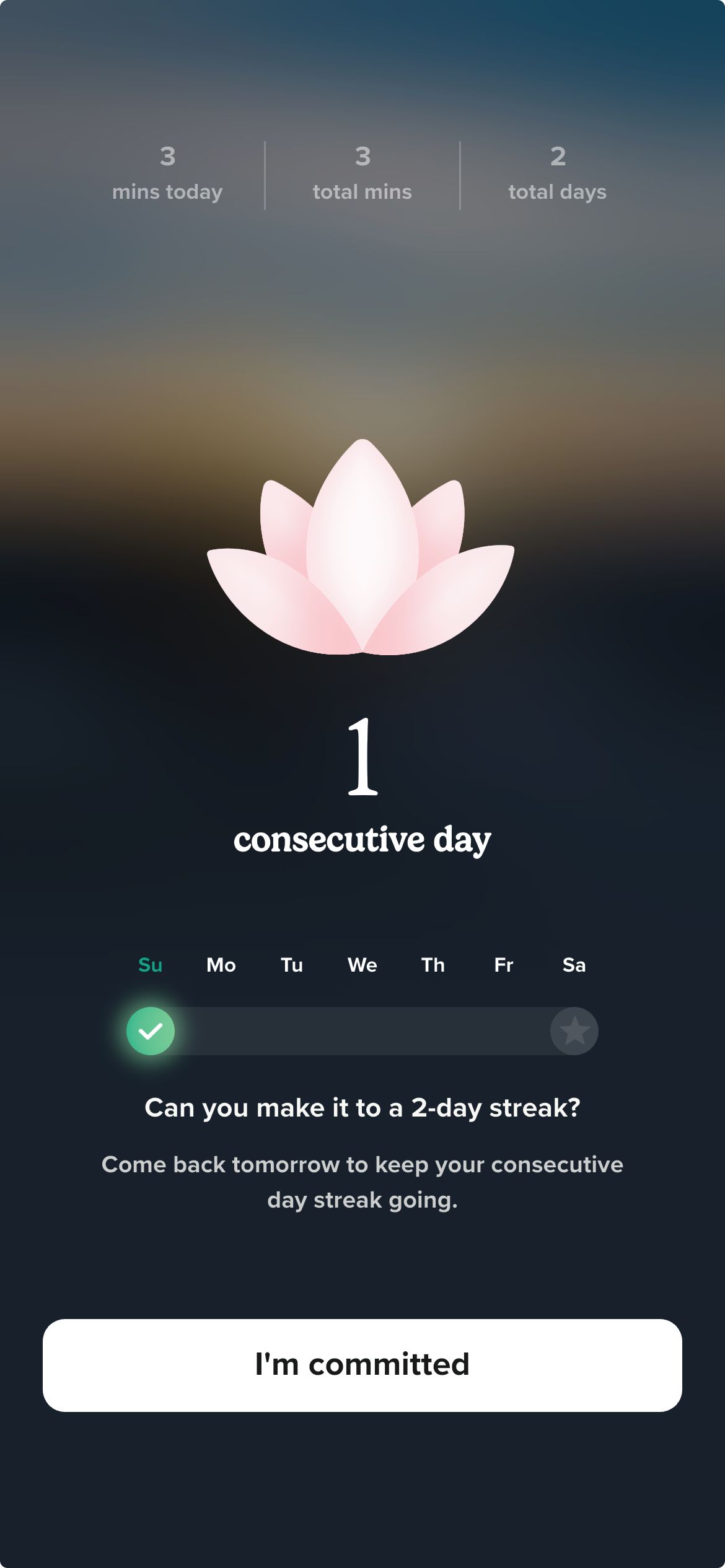
A consecutive-day streak is the primary retention mechanic, displayed as a flower/plant icon in the top-right corner of the home screen. The streak detail screen shows current consecutive days, progress toward the user's self-set goal (3 / 5 / 7 / 10 days, chosen during onboarding), a calendar of practiced days, and a milestones section. After the first session: 'Can you make it to a two day streak? Come back tomorrow.' An 'I'm committed' button appears. Installing the home screen widget extends the free trial from 7 to 30 days.
Why it works
The goal-setting screen during onboarding frames the streak as a self-made commitment, not an imposed requirement. The 'I'm committed' button reinforces that prior commitment at the moment of first completion. The trial extension triggered by widget installation rewards the completion of the app's most powerful habit-formation tool with more time to develop the habit that makes the subscription feel necessary.
The detail
The streak flower icon is visible immediately on the home screen without navigating anywhere. Goal-setting during onboarding frames the streak as a commitment the user made before their first session. Widget installation is prompted twice in close succession after the first session, with the stated rationale 'you're more likely to be consistent with your practice.'
Takeaway
The trial extension (7 days to 30 days) is triggered by installing the home screen widget, rewarding the completion of Insight Timer's most powerful habit-formation tool with more time to form the habit.
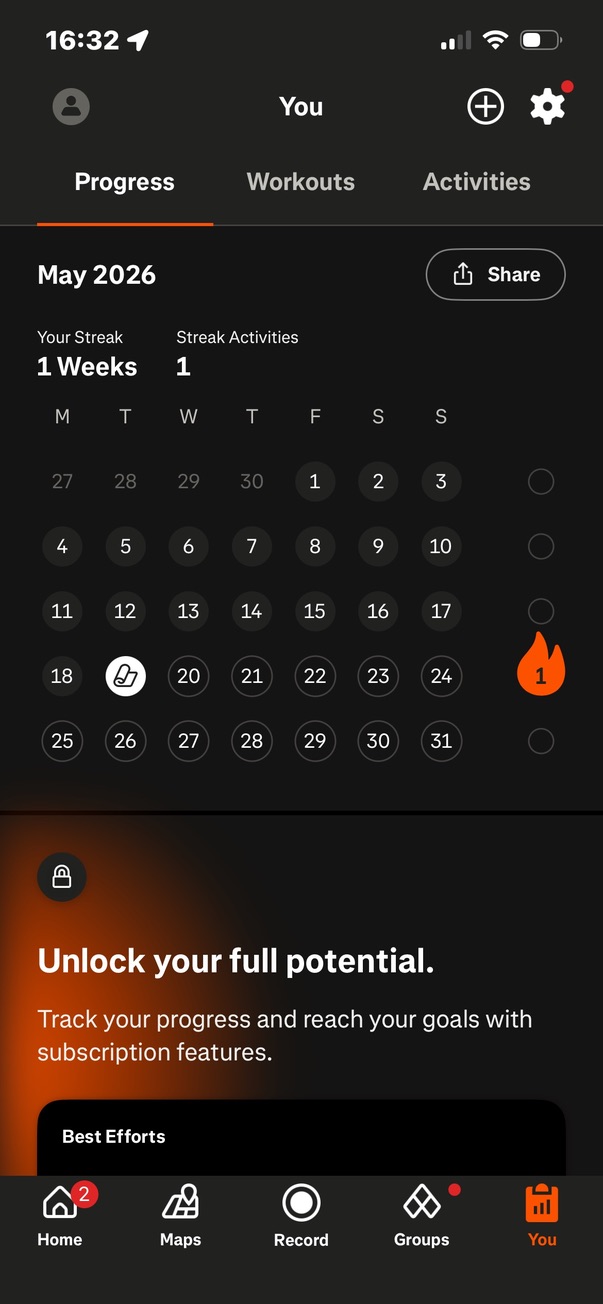
Strava counts its streak in weeks rather than days, so the state depends on logging an activity inside a 7-day window rather than on returning every day. The streak sits on the home dashboard as your streak, a flame icon with the count enclosed in it, reading zero weeks on a new account. The copy beside it states how to begin, by logging an activity. A view calendar button opens a fuller screen showing the streak activities and the current streak for the month, together with performance across the previous 12 weeks. The qualifying event is recording an activity, the same action the rest of the app is built around.
Why it works
The weekly period is the choice worth noticing. Strava counts weeks on a streak, so a user keeps the state through activity within a week instead of a daily return. The calendar view sets the current count against 12 weeks of prior performance, so the number arrives with history behind it rather than alone.
The detail
For fresh users, the streak is highlighted at the top of the home dashboard, as the first item in a carousel of relevant information for the user. It has a section of its own in the user's progress tracking part of the app, where the user can see their current streak in weeks and their recorded activities for the month. A share button lets the user choose between a number of pre-set visuals to share the streak with people outside the app.
Takeaway
Strava measures the streak in weeks, so the state is kept by logging one activity inside a 7-day window.
You tab streak calendar view showing the 12-week history grid, the current month calendar, and the "unlock your full potential" subscription prompt below
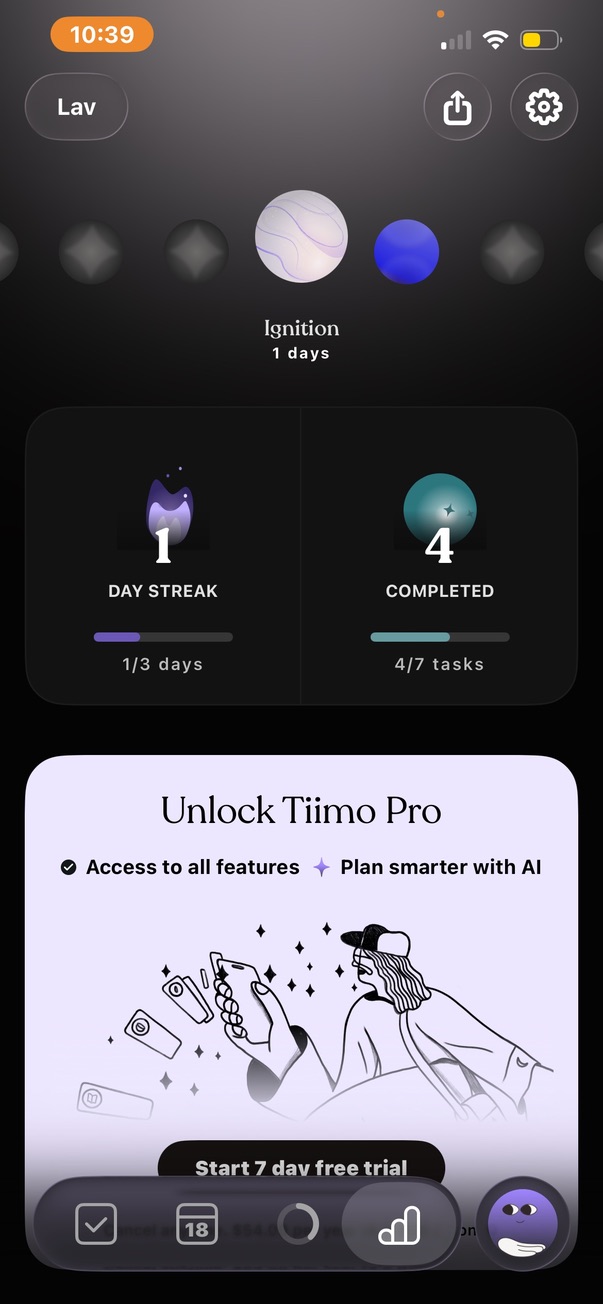
The streak counter appears as a flame icon in the top-left corner of every screen, the most prominent persistent placement in the library. It is the first element described when the home screen loads. The streak is introduced during onboarding through a swipe-to-unlock physical gesture: "Ignition ready to unlock, your first streak starts today, one small step at a time, we will celebrate every step with you." The swipe immediately awards the first marble (Ignition). The Stats tab shows the streak progress bar with the next milestone: "1 out of 3 days," and the full marble ladder from current position to 1,600 days. Streak and Levels is a named notification category in settings, meaning alerts specifically around streak status are available as a distinct push channel.
Why it works
The swipe-to-unlock gesture creates a small physical ceremony around the streak's beginning that a button tap does not. The user has performed a deliberate action to initiate their streak before completing a single real session, a behavioral commitment made before there is anything to lose. The 1,600-day endpoint implies a 4+ year engagement arc, making it the longest stated streak progression in the library.
The detail
The flame icon is visible on every tab without navigation. The Stats tab opens to the streak progress bar, next milestone label, and the full marble row. The onboarding frames the streak as a celebration system: "we will celebrate every step with you", not as a retention mechanism.
Takeaway
The streak is introduced via a swipe-to-unlock gesture during onboarding, a physical commitment ceremony that creates psychological investment before the first real session.
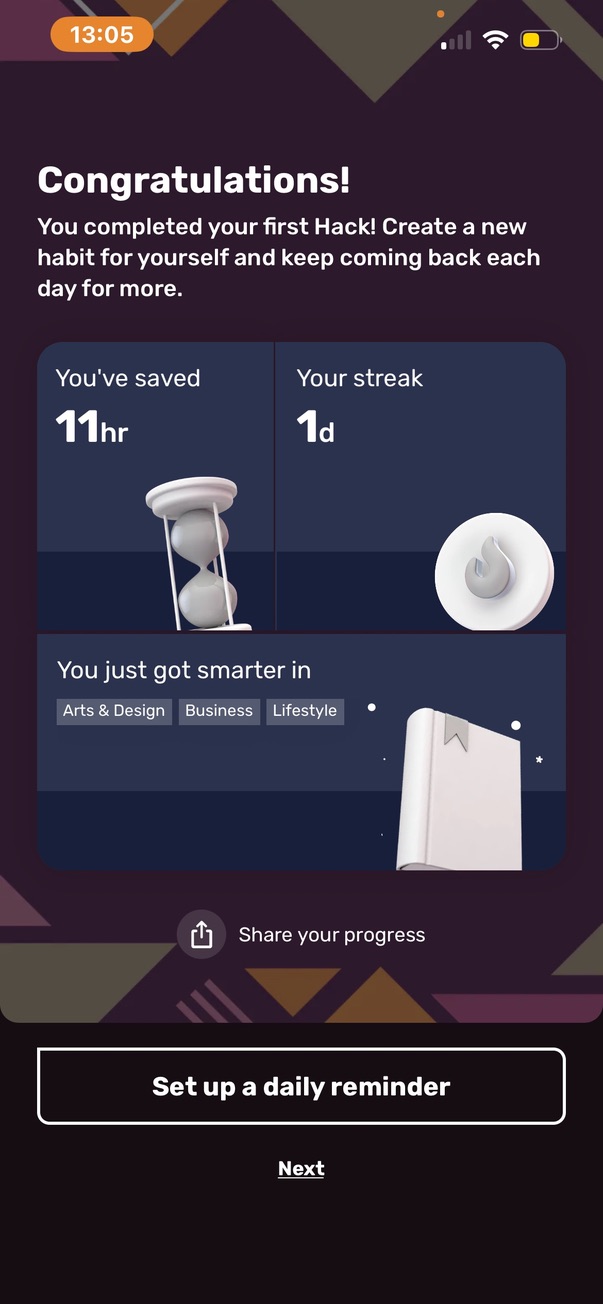
The streak counter appears in the top-right corner of the home screen immediately after the first hack is completed. The You tab opens directly to My Stats where the streak is the first element: "One day complete, complete one insight a day from any hack to get your daily streak." The daily minimum is explicitly stated on-screen: one insight from any hack, not a complete hack. After the first hack, a congratulations screen appeared: "you've saved 11 hours, your streak: one day, you just got smarter in [topics]," followed immediately by a "set up a daily reminder" button. Sharing is built in: tapping share generates a visual card ("one day, your streak, keep going with your learning habit") ready to post to social platforms.
Why it works
The one-insight minimum is the most forgiving streak definition in the library, less demanding than Insight Timer's single session or Strava's weekly activity. A user who has five minutes and opens one card maintains their streak. The reminder setup button appearing after the first hack completion rather than during onboarding follows the same pattern Insight Timer uses, capturing the return habit at the moment the user has just experienced the product's value, not before they have any reason to care.
The detail
The streak counter is visible in the top-right corner of the home screen alongside the premium trial countdown. The daily minimum action is defined on-screen in plain language. The post-hack congratulations screen surfaces the reminder setup button at peak engagement rather than during onboarding.
Takeaway
The one-insight daily minimum is the lowest streak bar in the library, a single card swipe satisfies the streak requirement, making this accessible even on the user's busiest days.
Wakeout counts a streak of days on which we reached the daily watts goal, sitting beside the goal total rather than tracking its own separate action. After the goal was reached, the app recorded a one-day streak, shown on the home screen next to the watts total, and a section on the progress screen headed "activity goal streak, reach your goal, increase your streak" kept the same count alongside a calendar and a longest streak record. We reached it through a gym session recorded that day, not through completing a wakeout inside the app itself. Settings also carries a control described as "take a day off," which turns off notifications for a chosen number of days under copy reading "don't break your streak."
Why it works
The qualifying event for the streak is reaching the day's watts goal, the same event Wakeout already celebrates on its own, so the streak adds a cumulative layer on top of a threshold that is already being tracked rather than asking for a separate action. Framing the day off control around not breaking the streak, rather than only around muting notifications, keeps the streak named as the thing being protected, as with the watts system above.
The detail
The streak count sits at the top of the home screen beside the watts total, and reappears inside the activity goal streak section on the progress screen and as a longest streak figure in the watts stats. The day off control sits in settings, framed around protecting the streak rather than around notifications alone.
Takeaway
A day counts toward the streak by reaching the watts goal for that day, the same event that triggers the goal achieved pop up.
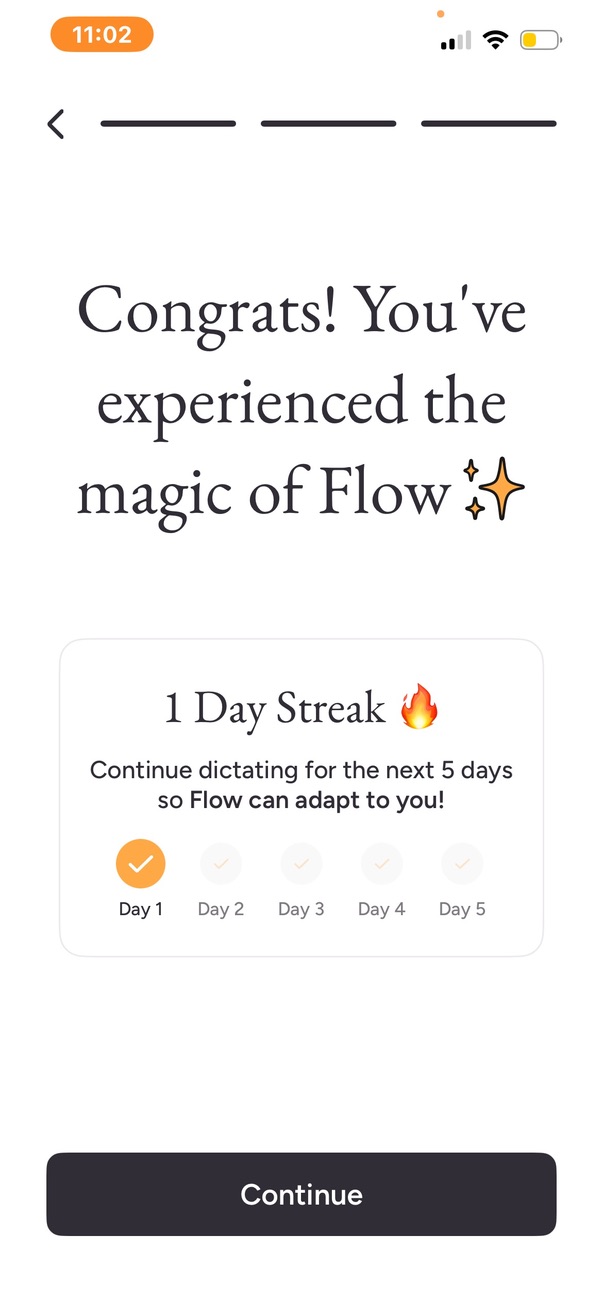
A streak counter appears on the home screen after the first dictation session, displaying as one of four summary cards alongside word count, words-per-minute, and trial status. The first appearance is a full-screen celebration: 'one day streak, continue dictating for the next five days so Flow can adapt to you.' The streak is framed as a functional product benefit, five days of use allows the AI to adapt to the user's voice and speech patterns, rather than as a retention mechanic.
Why it works
Framing the streak as a product improvement mechanism, 'Flow will adapt to you', is the only instance in the library where a streak is explicitly justified to the user on functional grounds. The stated five-day endpoint gives the streak a defined duration rather than an open-ended consecutive-day requirement, making it a bounded commitment the user can evaluate before agreeing to it.
The detail
The streak celebration appears at the conclusion of the onboarding test dictation, before the user has seen the home screen. On the home screen, it appears as one of four cards with a named milestone label: 'Day one, momentum begins,' implying future milestones have their own named labels.
Takeaway
The streak is framed as a product improvement mechanism, 'so Flow can adapt to you', rather than a retention incentive, the only such framing observed across the library.
Each week we add three fresh breakdowns of how successful apps implement game mechanics. Get the most interesting mechanics from each, straight into your inbox.