Named, permanent markers of progress or behaviour that the user collects over time.
Best for
AchieverExplorer
Context
ActivationRetentionReferral
Motivation drivers
MasteryCompetenceRelatedness
How it works
Permanent recognition of behaviour creates identity anchors
Achievement systems exist primarily for Achievers. Each completed milestone is a named, permanent record of accomplishment. Tiered achievements extend the goal horizon indefinitely. The mechanic works best when the marker carries value beyond the product that issued it, a badge that can be shared or displayed externally has a second life the app cannot provide.
Core principle
Permanent recognition of behaviour creates identity anchors. The badge is not a reward, it is evidence.
Watch out for
Achievement systems buried deep in settings see almost no organic discovery. Surface achievements at the moment of completion, not in a tab the user never opens.
Structural variants
Four ways to build it
01
Tiered badges
02
Hidden achievements
03
Social badges
04
Certification achievements
Lifecycle placement
Long-term value. Achievers return specifically to close achievement gaps.
Case studies · 9
Seen in the wild
CanvaDesign
How they use it
Design School houses the achievement system. Named badge tiers: First Course / Three Courses / Five Courses, First Certificate / Three Certificates / Five Certificates, Sharing Superstar, and LinkedIn Official. Badges display as a grid, grayed out until earned, each with a 'Browse Courses' CTA. Completing a quiz triggers a two-step reveal: a confetti screen announcing the badge, followed by the certificate with credential ID, date, and shareable options.
Why it works
The certificate is designed to leave the app. A credential ID and shareable card make the completion artifact credible enough for LinkedIn or a portfolio. The LinkedIn Official badge names its distribution channel directly, a platform-specific instruction that signals exactly where the achievement should go without requiring the user to figure it out.
The detail
Achievements are inside Design School, accessed via the sidebar. The section has four sub-tabs: Overview (aggregate stats), Badges, Certificates, and Skills. Completing the AI Skills for Students quiz during analysis triggered both the First Certificate badge and a downloadable certificate with a credential ID.
Takeaway
The LinkedIn Official badge names LinkedIn specifically as its sharing target, the most platform-specific social sharing incentive observed across the library.
screenshot
Achievements section in Design School showing the badges grid — First Course, First Certificate, Sharing Superstar, LinkedIn Official — with grayed-out unearned badges and the Browse Courses CTA
screenshot
Certificate of Completion popup showing confetti, "You've hit a learning milestone" message, and the "You're Canva Certified" follow-up with social share and download options
Achievement milestones are tied to chapter completion and survival day records. Clearing Chapter 1 (survive 60 days) unlocks Chapter 2 content and is treated as a named milestone. Personal best run length is shown on every defeat screen, framing every run as a score-attack against the player's own record. The roguelite structure inherently milestones every improved personal best.
Why it works
The defeat screen personal best display converts every run-end moment into a progress marker, even a failed run sets a new context for the next attempt. This reframes failure as data about the next run rather than a pure loss.
The detail
Chapter completion triggers a dedicated celebration sequence. The defeat screen shows personal best run length prominently. Chapter completion gates feature unlocks, each chapter milestone reveals new content systems.
Takeaway
Personal best run length is displayed on every defeat screen, reframing failure as a score-attack milestone rather than a pure loss.
Fortune City has 100 named achievements organized into themed groups, accessible via the hamburger menu under Your City. The groups cover behavioral milestones (consecutive tracking days), city progression (prosperity levels, population counts), expense category tracking (Foodie Paradise, Beverage Bay, Shopping Mecca, each scaling from 10 to 100 recorded expenses), ad engagement (Watch Ads to Help the Salesman, 5 to 1,000 watches), social behaviors (City Photographer, sharing photos 5 to 50 times), and cross-app installs (Best Apps, downloading Plant Nanny, To Do Adventure, and other Sparkful titles). Achievement popups appear automatically after triggering actions and can fire in quick succession after a single expense entry.
Why it works
The achievement system does three jobs simultaneously: it rewards core behavior (expense logging), it rewards platform-beneficial behavior (ad watching, app downloads, social sharing), and it distributes the premium currency (diamonds) that funds citizen recruitment and city themes. The 100-achievement count makes this the most expansive achievement system in the library, large enough that no two users will complete the same subset in the same order.
The detail
Achievement popups appear as overlay cards with the achievement name, badge, diamond reward, and a share button. The full list is browsable in the Achievements tab, organized by group, with earned badges visually distinct from locked ones. The diamond reward is visible on each card. Two achievements completed in the first session.
Takeaway
The Watch Ads to Help the Salesman achievement track (5 to 1,000 watches, ending in Charitable Superstar) is the only achievement system in the library that makes ad watching a named, tiered progression goal.
screenshot
Achievements tab showing Great Habits group (1-day, 3-day, 7-day, 30-day, 90-day consecutive tracking badges) with earned badges lit and unearned grayed, diamond reward amounts visible
screenshot
Achievement popup showing "Making a Difference — Build your first building — reward 3 diamonds" card with share button
Milestone thresholds: 7 consecutive days (first milestone), 50 non-consecutive days, 1 milestone, 5 milestones, 25 milestones, 100 milestones. Each milestone unlock triggers a 'you've unlocked a gift' screen framing the reward as something the user earned. The trial extension at the first milestone extends from 7 to 30 days. Stats accumulate permanently: total sessions, total minutes, milestones count, longest streak.
Why it works
The trial extension at the first milestone is the most structurally sophisticated achievement design in the library, it rewards reaching a milestone with more time inside the product, making the achievement's value inseparable from continued engagement. The 'gift' framing uses reciprocity rather than reward language.
The detail
Milestones appear in the streak detail screen. Each achievement triggers a 'gift you've unlocked' screen. The full stats history is visible in the profile sidebar.
Takeaway
The first milestone (7 consecutive days) triggers a trial extension from 7 to 30 days, the achievement reward is more product access, making continued engagement the most natural next action.
screenshot
Streak screen showing the milestones ladder — 7 consecutive days / 50 non-consecutive days / 1 milestone / 5 milestones / 25 milestones / 100 milestones — with the current 0 milestones state
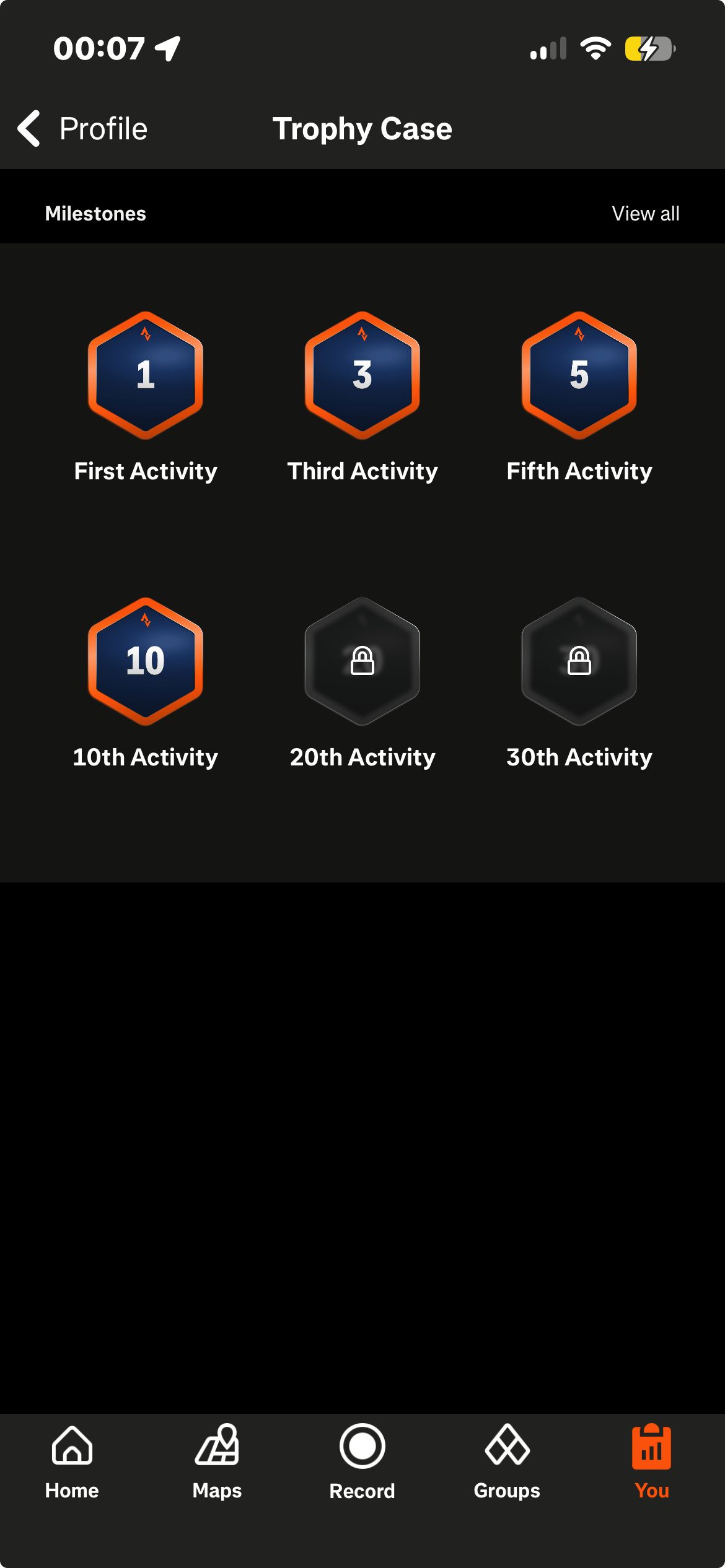
Strava places its first recognitions close to the start. The trophy case opens with the 1st activity, then the 3rd, the 5th, and the 10th, and the same ladder continues up to 1,000. The first trophy arrives immediately after the first activity is saved, as a pop up welcoming the user and marking the activity, offering a choice between viewing the activity and viewing the new trophy in the case. Alongside these count based trophies, Strava marks personal records against a user's own history, and after the first saved ride the app showed a personal record badge reading new best effort, longest ride ever. Completing a named challenge adds a digital trophy to the same case. Other users' profiles display how many trophies they hold and at what grade, with counts such as 53 trophies and 10 silver among the ones we saw.
Why it works
The spacing of the early thresholds is the notable part. 1st, 3rd, 5th, and 10th activity sit close together at the beginning of a ladder that runs to 1,000. Strava also runs two kinds of recognition next to each other. The trophy case counts activities, a measure that only accumulates. The personal record compares a result against the user's own previous results, so that recognition does not depend on how the user compares with other users. The first trophy is given for the first activity, which puts the first recognition at the same moment as the first use of the core action.
The detail
The trophy case sits at the bottom of the profile, with a view all listing that runs the thresholds up to 1,000 activities. A personal record attaches to the activity that earned it rather than living only in the case. The first activity is marked with a celebratory animation and the welcome pop up, which offers the trophy case as one of its two next steps.
Takeaway
Strava's trophy case starts at the 1st activity and marks the 3rd, 5th, and 10th before continuing to 1,000.
The marble collection system on the Stats tab is the primary achievement display. Marbles are collected in a horizontal scrollable row, each representing a named milestone on two tracks: task completion (Ignition at day 1, Spark at first task, then 7, 14, 30, 60, 110, 160, 250, 360 tasks, to 30,000) and streak days (1, 3, 7, 10, 14, 21, 30, to 1,600). Each marble has a distinct visual design. The distinctive behavior: unlocking a marble changes the background gradient of the Stats tab to reflect the new marble's color, the entire ambient visual environment of the screen shifts with each achievement.
Why it works
The background gradient color change is the most visually integrated achievement reward in the library. In every other app, achievements add a new badge or item to a static display. Tiimo's marbles change the ambient visual environment of the screen, the achievement does not just mark progress, it alters the space the user inhabits. This is consistent with Tiimo's design philosophy for neurodivergent users, where visual clarity and satisfying feedback are primary values.
The detail
The marble row is the first element on the Stats tab, above the streak bar and task counter. Marble unlocks trigger celebration animations. Locked future marbles are visible with countdown labels ("unlocks in 3 days"). The first two marbles (Ignition and Spark) were earned within a single onboarding session.
Takeaway
Unlocking a marble dynamically changes the background gradient of the Stats screen to reflect the marble's color, the only achievement reward in the library that alters the ambient visual environment rather than adding an item.
screenshot
Stats tab marble row showing earned Ignition and Spark marbles alongside locked upcoming marbles with "unlocks in 3 days" labels, with the gradient background reflecting the current marble's color
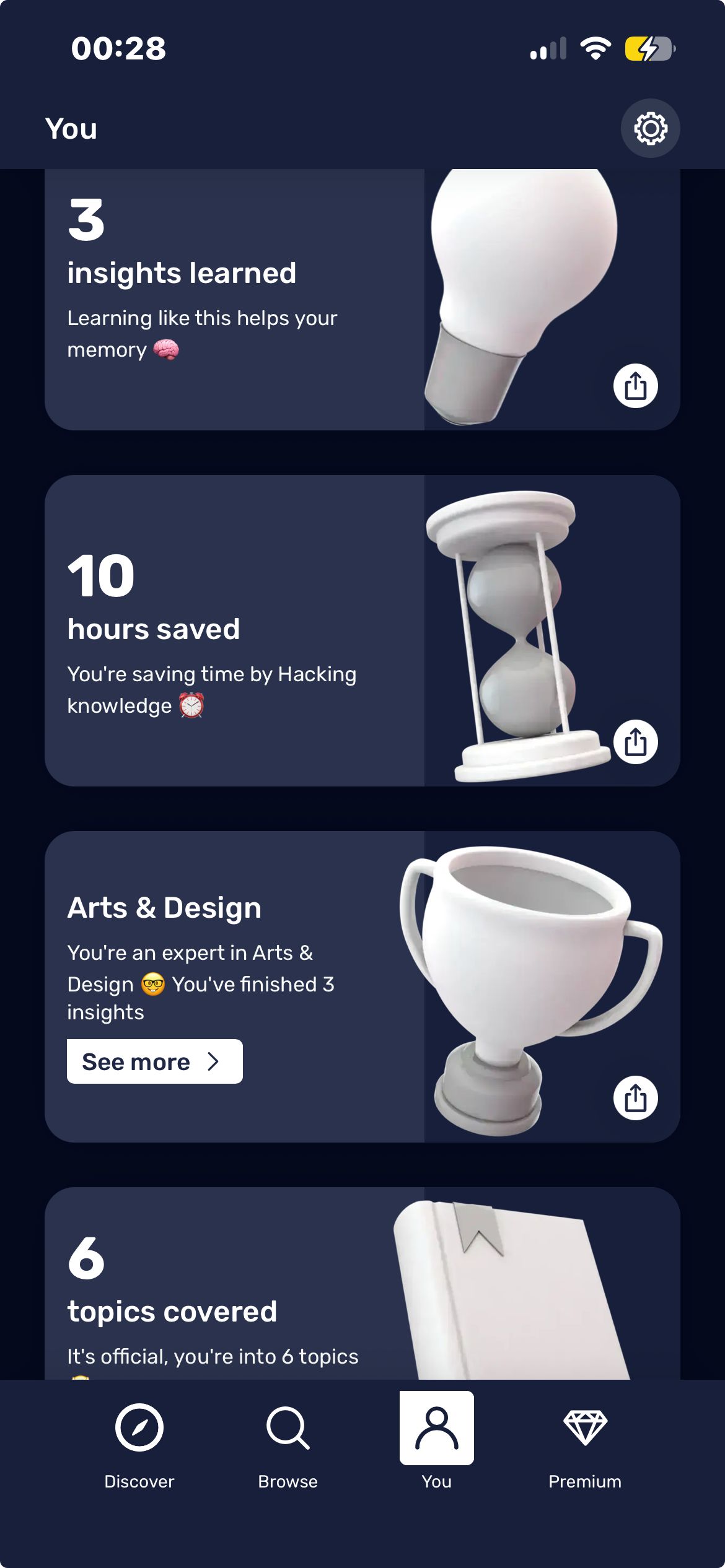
My Stats on the You tab contains a horizontally scrollable row of pre-formatted shareable achievement cards. Achievements earned in one session: 1 Day (streak milestone), 3 Insights Learned, 10 Hours Saved, Arts and Design (topic expertise badge), 6 Topics Covered. Each card has a distinct design and motivational label. Two types are interleaved: engagement milestones (days, insights, hours saved) and content expertise markers generated automatically from consumption behavior (completing hacks in a topic produces an "expert in X" badge). Tapping an expertise badge opens content in that topic rather than showing an achievement detail screen.
Why it works
The achievement system's primary output is social media content. Each card is pre-formatted and branded as a shareable image, "10 hours saved, you're saving time by hacking knowledge", designed to be posted rather than to be displayed in the app. The expertise markers ("you're an expert in arts and design") are automatically generated from consumption behavior without any explicit achievement hunting, making them feel like discovered facts about the user rather than manufactured rewards.
The detail
Achievements display as a card row in My Stats, no badge icons, locked future milestones, or progress bars. Cards appear only once earned. Each card has an individual share button generating a branded shareable image.
Takeaway
Achievement cards are designed as social media assets first, pre-formatted, branded, shareable images with motivational copy, and progress markers second.
The same watts that build toward the day's target also cross a threshold Wakeout marks on its own, separately from the number simply climbing. On the first screen after subscribing, we had already met the day's goal: a pop up read "daily goal achieved," with a notification stating "613 watts, like discovering a new planet, you've conquered your active goal." Wakeout had pulled our Apple Health history during onboarding, and our analyst had been moving that day before opening the app, so the credit arrived before we had set eyes on any target. The same crossing also marks a check mark on the home screen bar. A second, higher threshold sits above the first, introduced in onboarding as a super active day and tracked in its own counters alongside the ones for ordinary active days.
Why it works
Two different thresholds sit on the same watts total, and only the first one comes with an explanation. Reaching the ordinary goal is celebrated immediately with a name for what happened, while the super active status is only ever a counter and a line of onboarding copy, with no equivalent celebration attached to it. That gap leaves a second goal standing behind the first, visible but undefined, once the one that was explained has already been met.
The detail
Crossing the first threshold produces a full screen pop up shown immediately, before we had otherwise opened the app that day. Beyond that single moment, the state is kept quietly: the check mark on the home screen bar, a calendar on the progress screen recording which days were active, and the day-state counters described above.
Takeaway
Crossing the daily goal produces a full screen pop up naming the achievement, distinct from the bar simply filling further.
Two achievement-adjacent surfaces were observed. The word count milestone: after crossing 500 words dictated, the speaking speed stat (words per minute) unlocks on the home screen, accompanied by a percentile ranking, 'top 2% of all Flow users', at 674 words dictated during analysis. The session also displayed '674 words, you've written 13 postcards,' translating the raw word count into a real-world equivalence anchor.
Why it works
The user didn't enter a competition, they just used the product. After crossing 500 words, a percentile ranking appeared that positioned their speaking speed favorably among all users. This is a social comparison metric delivered passively through usage, rewarding engagement with a flattering comparative signal without requiring any deliberate performance.
The detail
The milestone is previewed in advance as a progress prompt: '276 more words to unlock your speaking speed.' After crossing the threshold, the stat appears on the home screen card alongside the day streak. The percentile ranking appears as a named comparative result, not a badge.
Takeaway
The 'top 2% of all Flow users' percentile emerges from hitting a word-count threshold during normal use, not from any competitive entry, a social comparison delivered passively.
screenshot
Home screen word count card showing "674 words dictated — you've written 13 postcards" alongside the 129 wpm card with "top 2% of all Flow users" label
Each week we add three fresh breakdowns of how successful apps implement game mechanics. Get the most interesting mechanics from each, straight into your inbox.